✦ New: Top 15 AI Writing Tools for 2025 — Tested & Ranked Read Now →


Affiliate Disclosure
Affiliate Disclosure: This review contains affiliate links. If you decide to join Kre8or.ai through my link, I may earn a commission at no additional cost to you. I only recommend products I genuinely believe provide value, and my opinions are based on my own early-access exploration and independent evaluation of the platform.
⭐ Quick Verdict
After spending time exploring Kre8or.ai during its early access period, I found it to be one of the most promising AI creator platforms I’ve tested recently. Unlike many AI tools that focus only on image generation, Kre8or.ai combines AI creation, creator challenges, workshops, community interaction, and an affiliate program into a single ecosystem.
Although the platform is still evolving before its public launch, my overall experience has been positive. The interface is beginner-friendly, image quality is impressive, and the community-driven approach makes it stand out from many traditional AI image generators.
🚀 Want to Try Kre8or.ai Yourself?
If you’d rather explore the platform than just read about it, you can create a free Kre8or.ai account and experience the Workshops, Challenges, and creator community for yourself.
👉 Start with the Free Membership and upgrade only if it fits your creative workflow.
✅ Best For
- Content Creators
- Bloggers
- Affiliate Marketers
- Social Media Creators
- Designers
❌ May Not Be Ideal For
- Users looking only for AI writing tools
- People who need advanced photo editing software
My Ratings at a Glance
These ratings are based on my personal hands-on testing of Kre8or.ai during its early-access phase and will be updated as the platform evolves.
| Category | My Rating |
|---|---|
| Ease of Use | ⭐⭐⭐⭐⭐ (5.0/5) |
| AI Image Quality | ⭐⭐⭐⭐☆ (4.5/5) |
| Creator Ecosystem | ⭐⭐⭐⭐⭐ (5.0/5) |
| Workshop & Guided Creation | ⭐⭐⭐⭐⭐ (5.0/5) |
| Community & Challenges | ⭐⭐⭐⭐⭐ (5.0/5) |
| Pricing & Value | ⭐⭐⭐⭐☆ (4.5/5) |
Why You Can Trust This Review.
👉
My Testing Method
Unlike many AI tool reviews that are written after only a few minutes of testing, this review is based on my own early-access experience with Kre8or.ai before its public launch.
I personally explored the platform’s dashboard, AI image generation features, creator workshops, challenges, membership plans, earning system, and affiliate program. Every screenshot used in this review was captured by me during testing.
This review reflects my honest observations. While this article contains affiliate links, my opinions are independent, and I will continue updating this review as Kre8or.ai evolves after launch.
✓ Personally tested before public launch
✓ Original screenshots throughout this review
✓ No AI-generated opinions or copied content
✓ Review will be updated as new features are released
Original Screenshots From My Testing
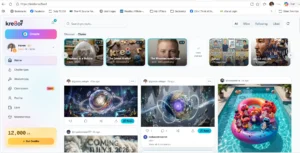
Every screenshot in this review was captured by me while testing Kre8or.ai during its early-access phase. Click any image to view it in full size.
Why Kre8or.ai Is Different
Most AI image tools do just one thing—but Kre8or.ai is building an entire creator ecosystem. Let’s see how it measures up:
📌Most AI platforms focus on only one task:
- AI image generation
- AI writing
- AI video creation
- Prompt libraries
- Chatbots
- After generating content, the user’s journey usually ends there.
📌Kre8or.ai combines multiple creator-focused features into one ecosystem:
- ✓ AI image generation
- ✓ Creator community
- ✓ Daily creative challenges
- ✓ Live workshops
- ✓ Character creation
- ✓ Affiliate earning opportunities
- ✓ Creator profiles
- Instead of simply generating images, the platform encourages creators to learn, improve, collaborate, and even earn rewards.
Dashboard Walkthrough
The dashboard is clean, beginner-friendly, and designed around creators rather than technical users. Navigation is straightforward, making it easy to move between AI generation tools, community activities, workshops, and account features.
Here’s a closer look at the main areas I explored during testing.
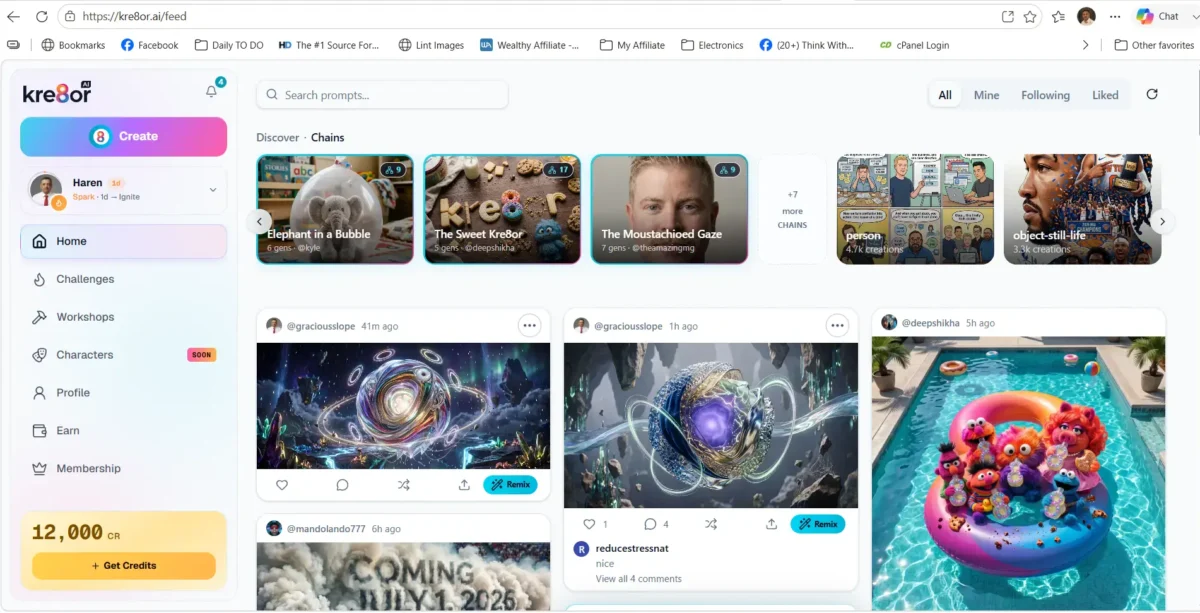
Home dashboard showing the creator feed, AI generations, navigation menu, and quick access to platform features.
💡 First Impression
The dashboard feels more like a creative social platform than a traditional AI tool. Instead of landing on a blank prompt screen, users immediately see artwork from other creators, active challenges, and featured content, encouraging exploration and participation.
Home Feed
The Home Feed serves as the central hub of the platform. It showcases creations from the community, featured artwork, trending content, and recent activity. This makes it easy to discover ideas, interact with other creators, and stay inspired.
Left Navigation Menu
The sidebar provides quick access to:
Home | Challenges | Workshops | Characters | Profile | Earn | Membership
During testing, I found the navigation intuitive and easy to understand, even for first-time users.
Creator Feed
Where most AI image generators immediately demand a prompt, Kre8or.ai invites exploration. Its creator feed showcases community artwork, giving the platform a lively, collaborative feel instead of an isolated one.
Create Button
The prominent Create button is always visible, allowing users to begin generating content with just a few clicks. New users should have no difficulty locating the primary creation workflow.
Kre8or.ai Workshops: Guided AI Image Creation
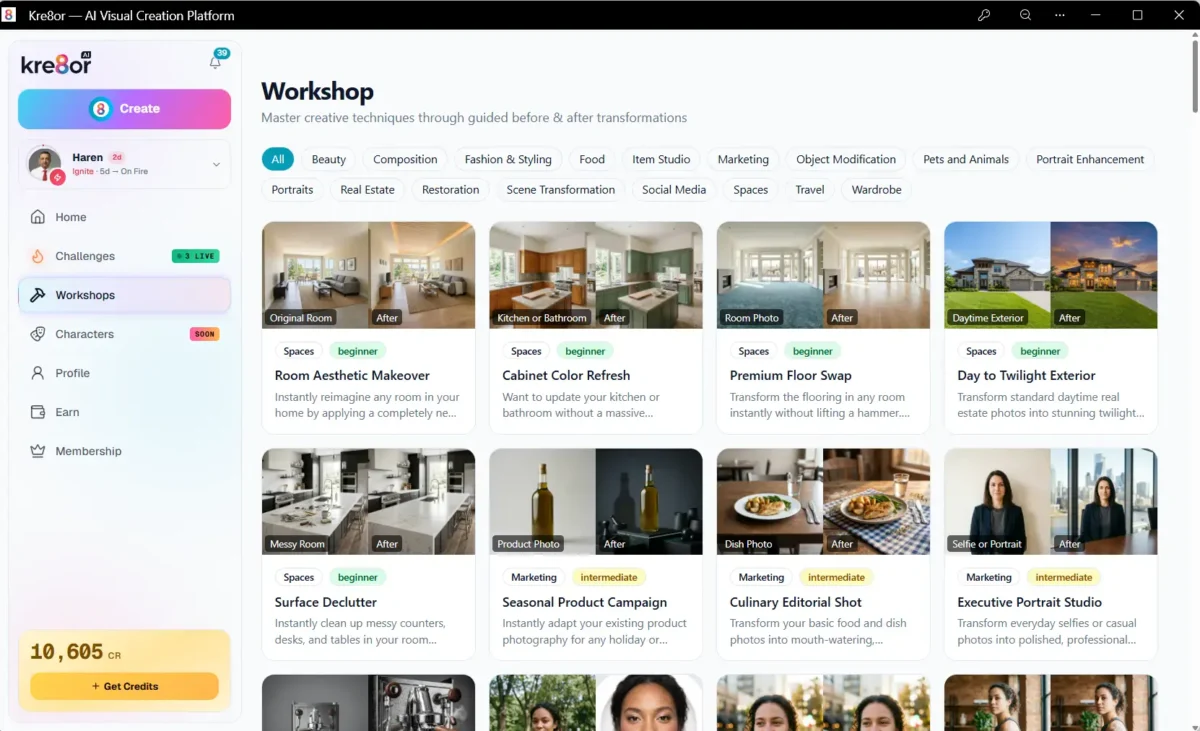
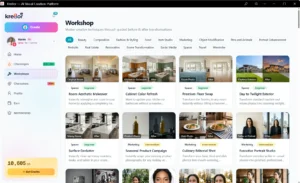
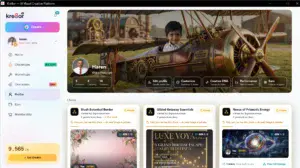
Caption: The Workshops Gallery offers guided AI projects designed to help creators learn new techniques while producing professional-quality results.
One of the features that impressed me most was the Workshop Library.
Rather than expecting users to write long prompts from scratch, Kre8or.ai organizes image creation into ready-made creative workflows called Workshops. Each workshop is designed around a specific goal—whether that’s creating a professional headshot, improving product photography, designing marketing visuals, or transforming everyday portraits into artistic styles.
💡 First Impression
After browsing the workshop library, it became clear that Kre8or.ai isn’t trying to be “just another AI image generator.” Instead, it focuses on solving real-world creative problems with guided workflows. This approach makes the platform much easier to use than many prompt-heavy AI tools.
How a Workshop Works
- Open the Workshops section.
- Browse the available creative templates.
- Choose a workshop based on the result you want.
- Upload your own image or select one you’ve already uploaded.
- Review the recommended settings and technique.
- Submit the job for processing.
- Download the finished image when the generation is complete.
During my testing, I found the process straightforward. The interface guides you step by step, so even someone with no experience using AI image generators should be able to complete a transformation without much difficulty.
Portrait & Personal Branding Workflows ⭐
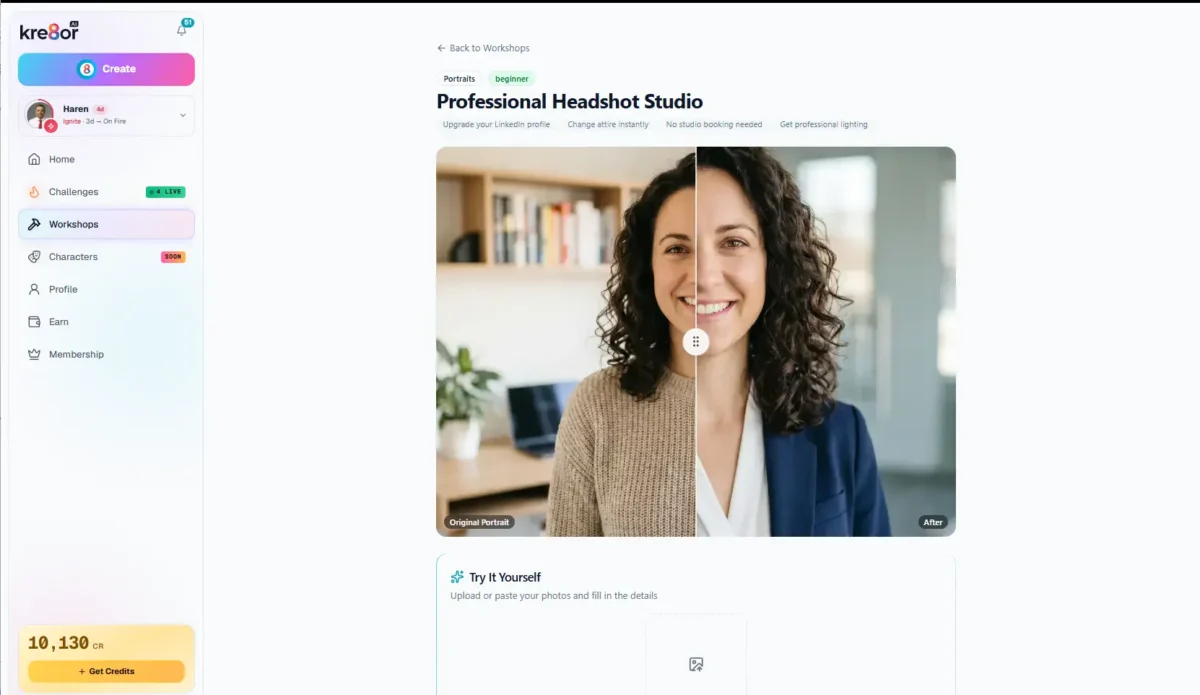
The portrait workshops are among the most practical features inside Kre8or.ai. Instead of offering a single portrait enhancement tool, the platform provides a wide variety of purpose-built workflows for different creative goals.
Whether you need a professional LinkedIn headshot, a podcast cover image, a magazine-style portrait, or a creative social media profile picture, there is usually a dedicated workshop designed for that specific outcome.
While my testing, I found these workflows especially useful because each one clearly shows a Before → After example. This helps you choose the right transformation before uploading your own photo, reducing the trial-and-error that is common with many AI image generators.
Like what you’ve seen?
The free membership gives you enough credits to explore the platform before deciding whether a paid plan is right for you.
👍 Best suited for
Personal branding, LinkedIn profile photos, Business websites, Podcast cover art, YouTube creators, Social media influencers, Bloggers and affiliate marketers.
💡 My Observation
One thing I appreciated was that Kre8or.ai focuses on real-world use cases rather than artistic experiments alone. Many of these portrait workshops produce images that creators and professionals can actually use for websites, resumes, social profiles, and marketing materials.
Marketing & Product Photography Workflows
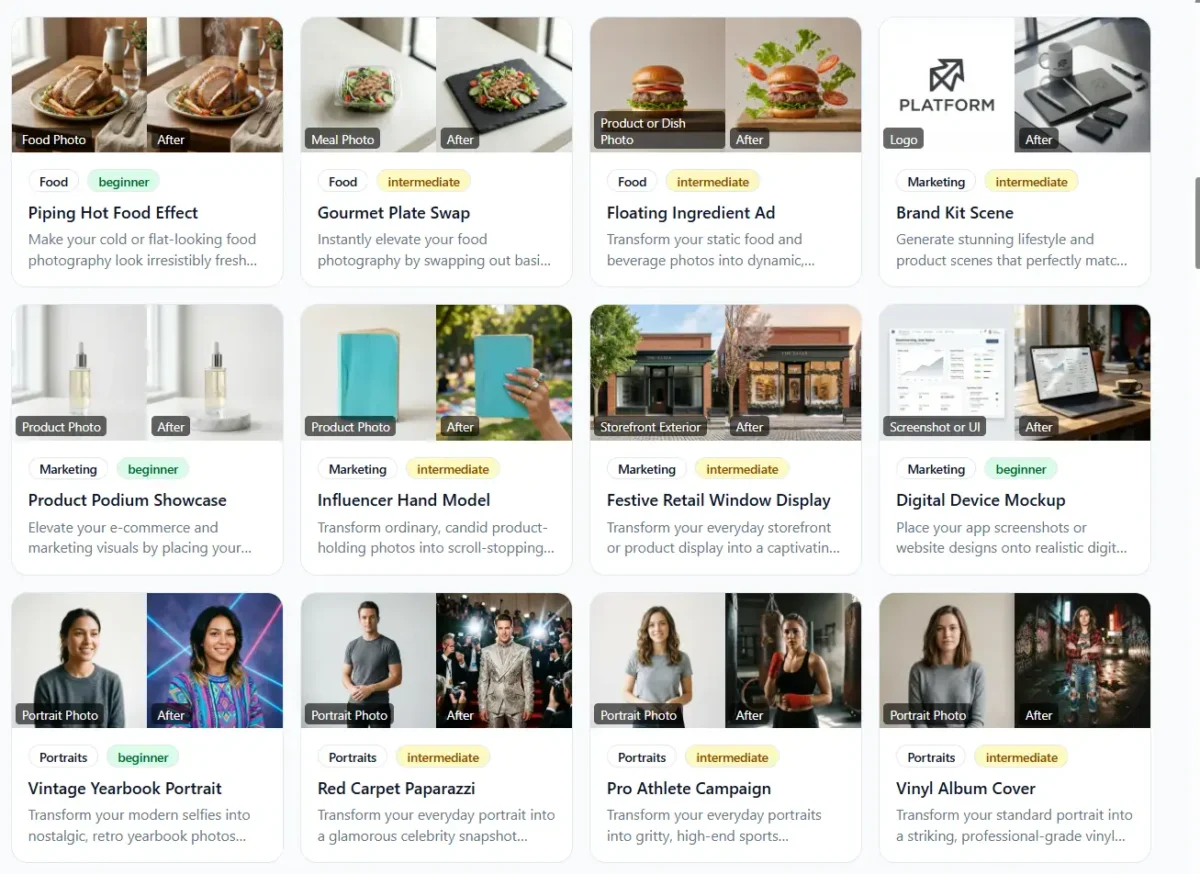
One area where Kre8or.ai stands out is its collection of marketing-focused workshops. While many AI image generators focus primarily on artistic creations, Kre8or.ai also includes practical workflows for businesses, bloggers, affiliate marketers, and e-commerce sellers.
These workshops can transform ordinary product photos into polished marketing visuals, create professional device mockups, enhance storefront displays, improve food photography, and generate branded promotional images. Instead of learning complex photo-editing software, users can achieve professional-looking results with just a few clicks.
As someone who regularly creates blog graphics and affiliate content, I found this category particularly valuable. High-quality visuals play an important role in attracting attention, improving engagement, and making online content appear more professional.
✅ Ideal for
Affiliate marketers, Bloggers, E-commerce store owners, Small business owners, Digital marketers, Social media managers and Product reviewers.
💡 My Observation
The marketing workshops are more than just visual effects. They are designed to solve everyday content creation challenges, helping creators produce images that are suitable for websites, advertisements, product pages, blog posts, and social media campaigns.
Creative Portrait & Lifestyle Transformations

Beyond business and marketing use cases, Kre8or.ai offers a growing collection of creative portrait transformations that allow users to completely change the style and mood of their images.
Whether you want a vintage film look, an anime-inspired portrait, a cyberpunk avatar, a magazine cover, or a dramatic cinematic style, these workshops make it easy to experiment with different visual identities. Each workflow is built around a specific creative concept, making it much easier to achieve consistent results than relying on generic prompts.
I found this section especially enjoyable to explore because it encourages experimentation. It is not only useful for content creators but also for anyone looking to create unique profile pictures, social media content, or artistic personal projects.
My Final Thoughts on Workshops
After spending several days exploring the Workshop library during Kre8or.ai’s early-access phase, I can confidently say this is one of the platform’s strongest features.
Rather than expecting users to write complex prompts from scratch, Kre8or.ai provides guided creative workflows that make AI image generation approachable, practical, and enjoyable. Each workshop includes a clear objective, before-and-after examples, and recommended techniques, making it much easier for beginners to achieve professional-looking results.
Whether you’re creating marketing graphics, professional headshots, product photography, food images, or artistic portrait transformations, the growing Workshop library offers something valuable for almost every type of creator.
Since Kre8or.ai is still in its early stages, I expect many more workflows to be added after the official launch. If the platform continues expanding this library at its current pace, I believe Workshops will become one of Kre8or.ai’s biggest competitive advantages and a key reason creators keep coming back.
Challenges
Compete, Learn & Earn Through Creative Challenges
One of the features that immediately separates Kre8or.ai from many AI image generators is its built-in Challenges system. Instead of simply generating images in isolation, the platform encourages creators to participate in themed competitions where they can practice new skills, receive community feedback, vote on submissions, and even earn cash rewards.
During my early-access testing, I found that Challenges transform AI image creation into an ongoing creative activity rather than a one-time image generation tool.
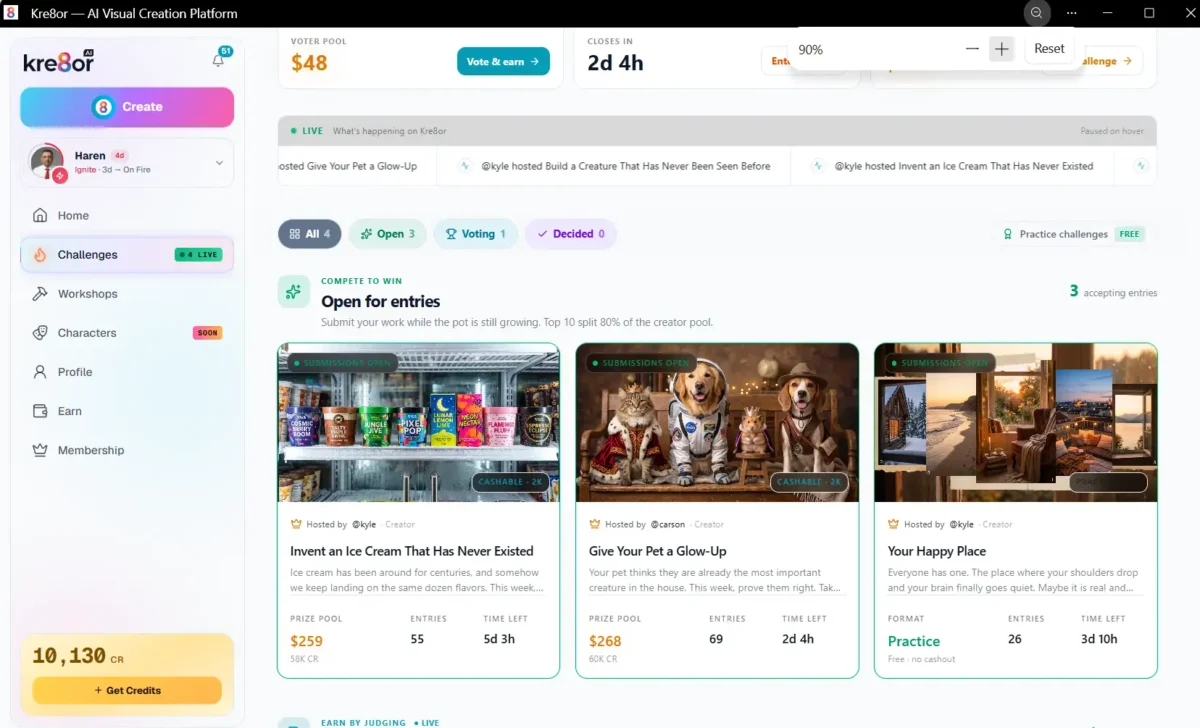
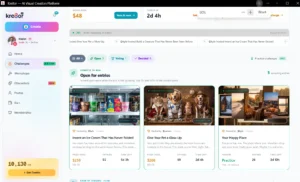
The Challenges dashboard displays active competitions, prize pools, entry counts, and practice challenges, making it easy to discover new creative opportunities.
How Challenges Work
Unlike traditional AI image generators that simply ask for a prompt, Kre8or.ai organizes regular themed competitions hosted by the platform.
The basic workflow is straightforward:
- Browse currently open challenges.
- Read the creative theme.
- Create an image that matches the challenge.
- Submit your entry before the deadline.
- Wait for the community voting phase.
- Winners receive recognition and, in eligible contests, cash rewards.
Because every challenge has a clear objective, I found it easier to experiment creatively without wondering what to make next.
Open Challenges
The Open for Entries section highlights competitions that are currently accepting submissions.
Each challenge card clearly displays:
Theme | Host | Prize pool | Number of entries | Remaining time | Cash reward eligibility
For example, during my testing I found themes such as:
- Invent an Ice Cream That Has Never Existed
- Give Your Pet a Glow-Up
- Your Happy Place
These changing themes encourage creators to explore ideas they might never have considered on their own.
Practice Challenges
One feature I particularly liked is the inclusion of Practice Challenges.
These allow new users to participate without competing for prize money, making them an excellent way to learn how submissions work before entering larger competitions.
For beginners, this removes much of the pressure often associated with competitive AI art communities.
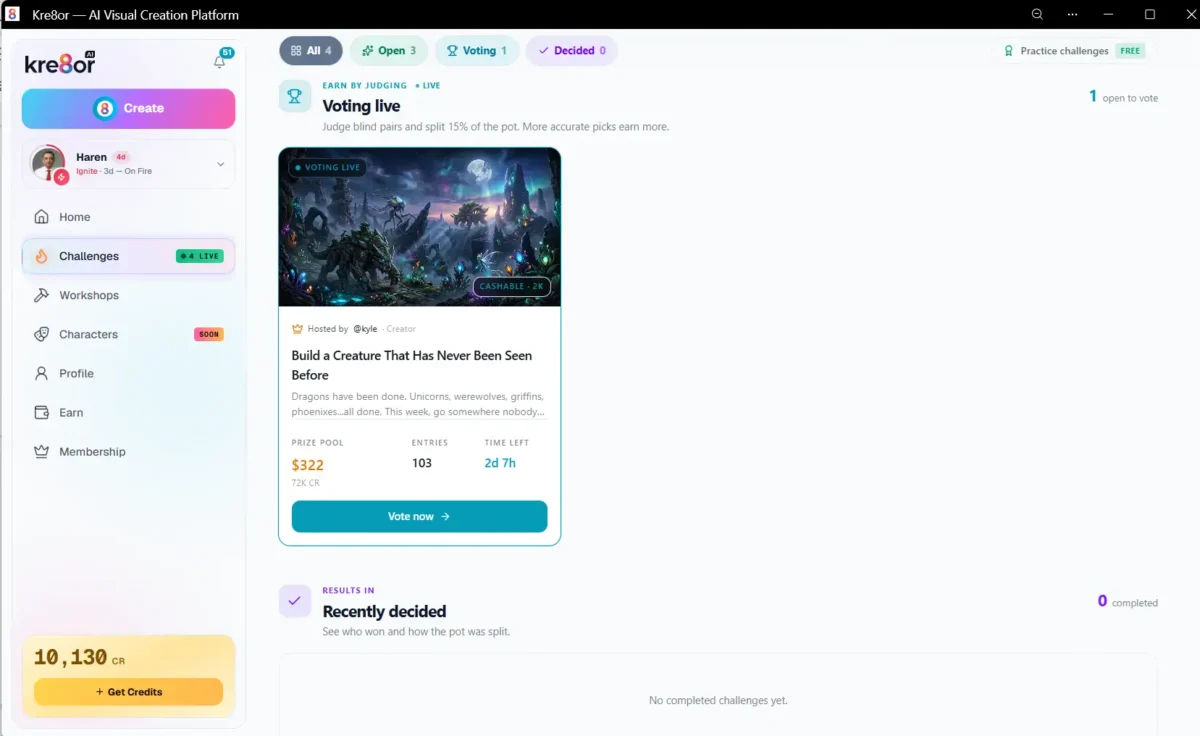
Once submissions close, challenges move into a blind community voting phase where creators help decide the winners.
Community Voting
One aspect that makes Kre8or.ai feel different from many AI platforms is the community voting system.
Rather than relying entirely on automated rankings, completed submissions enter a blind voting process where community members compare images and vote for their favorites.
According to the interface, voters can also earn a portion of the Voter Pool by participating thoughtfully in the judging process.
This creates an ecosystem where users are not only generating images but also helping evaluate creative work produced by others.
Community Voting & Fair Judging
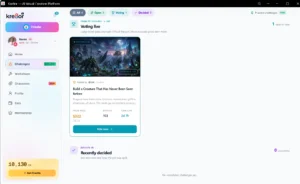
Before Voting: Understand the Challenge
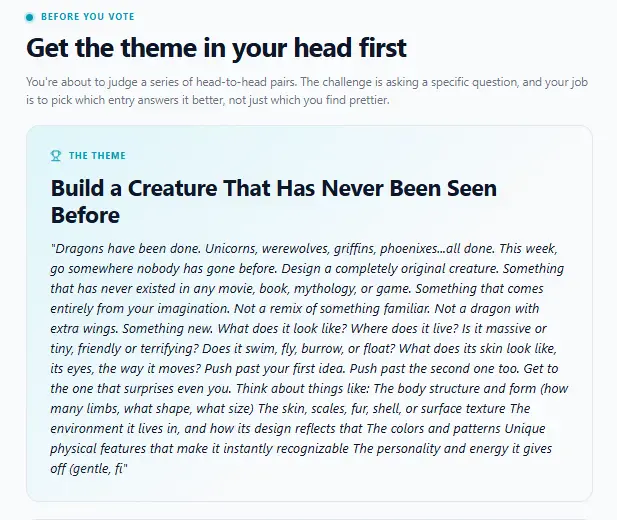
Before casting a vote, Kre8or.ai explains the challenge objective and provides guidance from the host to help voters understand what they’re evaluating.
| How Fair Voting Works |
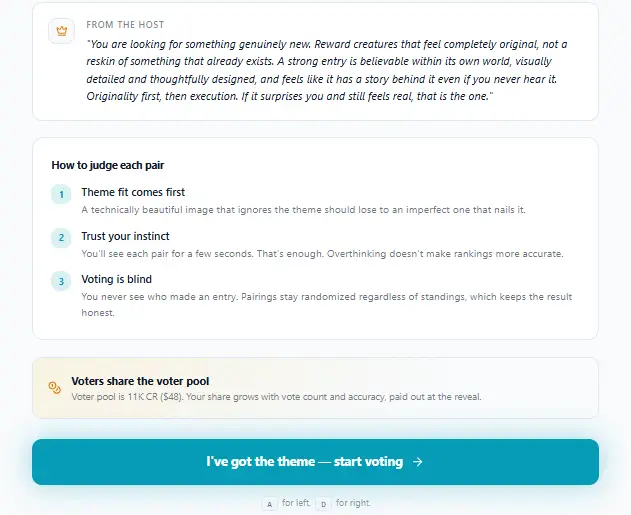
The platform encourages fair judging through blind voting, clear evaluation criteria, and community participation rather than popularity.
Before Voting
One of the features that impressed me most was the amount of thought Kre8or.ai puts into the voting experience.
Instead of immediately asking users to choose between two images, the platform first explains the creative objective of the challenge. Each competition includes a detailed description, advice from the host, and clear judging guidelines so voters understand what they should be evaluating.
For example, in the Build a Creature That Has Never Been Seen Before challenge, voters are encouraged to reward originality rather than simply selecting the most visually attractive artwork. This helps ensure entries are judged on how well they satisfy the creative brief instead of popularity or personal preference.
The voting process also follows several principles designed to keep the competition fair:
- Theme comes before visual appeal.
- Voters are encouraged to make natural, instinctive decisions.
- Creator identities remain hidden during voting.
- Rewards are based on thoughtful community participation.
This approach makes the Challenges system feel far more structured than many online creative competitions. Instead of becoming a popularity contest, it encourages creators to focus on originality while helping voters evaluate submissions more consistently.
💰 Earn Credits by Voting
One feature I didn’t expect to find during testing was that voting itself can become a way to earn credits. Rather than simply asking users to like images, Kre8or.ai rewards thoughtful participation in the judging process.
During one live challenge I participated in, there were 103 entries, resulting in 5,253 possible head-to-head comparisons. As I voted through randomly selected image pairs, the platform tracked both my progress and my voting accuracy. Instead of rewarding speed, Kre8or.ai estimates earnings based on how closely your decisions align with the final community consensus after voting ends.
This approach encourages careful evaluation rather than random clicking, making the voting system feel fair for both creators and judges while helping maintain the overall quality of challenge results.
💡 My Observation
During testing, I liked that Kre8or.ai rewards thoughtful participation instead of encouraging people to rush through votes. The estimated earnings increase only if your choices consistently match the final community consensus, making the judging process feel more meaningful than a simple “like” system.
Why I Like This System ⭐
Most AI image generators stop after producing an image. Kre8or.ai continues the creative journey by encouraging creators to:
- Join themed competitions
- Learn from other submissions
- Vote on community artwork
- Improve through regular practice
- Earn rewards for both creating and participating
That combination makes the platform feel more like a creative community than a standalone AI tool.
My Experience
During testing, I appreciated how simple it was to understand the challenge lifecycle. The interface clearly separates competitions into Open, Voting, and Completed stages, so you always know what is happening.
Even if you don’t enter every competition, browsing current challenges is a great source of inspiration. The changing themes encourage experimentation and help overcome the common problem of not knowing what to create next.
⭐ My Thoughts on Challenges
The Challenges feature is one of Kre8or.ai’s biggest strengths. Instead of treating AI image generation as a solo activity, it introduces friendly competition, community participation, and opportunities to learn from other creators. Whether you’re entering for fun, practicing your skills, or aiming for cash rewards, the system adds purpose and motivation that many traditional AI image generators simply don’t offer.
🎁
You Can Now Enter Challenges in Two Ways
Paid Entry: Use your AI credits to enter any eligible challenge instantly.
Free Entry: Earn one free challenge entry each month by completing the required community participation milestones.
🎁 Free Challenge Entry Every Month
One of the most creator-friendly updates to Kre8or.ai is the introduction of Free Challenge Entry. Instead of spending credits every time you want to compete, active community members can now earn a free challenge entry every month by meeting a few simple participation requirements.
💡
Key Insight:
Free entries compete alongside paid entries and are eligible for the same prizes, making challenges accessible even if you’re conserving credits.
Instead of spending credits every time you want to compete, you can unlock a free monthly entry simply by being an active member of the community. After verifying your account and completing the monthly voting requirement, Kre8or.ai awards you a free challenge entry that covers the normal entry fee.
Even better, free entries are judged exactly the same as paid entries, meaning you remain eligible for the full prize pool. If you don’t use your free entry immediately, it can be banked for up to three months, giving you the flexibility to save it for challenges you really want to enter.
This update reflects what I like most about Kre8or.ai’s challenge system. Rather than rewarding only creators who spend more credits, it encourages consistent participation and community engagement. Whether you’re just starting out or creating professionally, everyone has a genuine opportunity to compete and win.
Membership & Pricing
One of the first questions most people ask before joining any AI platform is whether the pricing is reasonable and what they actually receive for their money.
During my early-access testing, I spent time exploring Kre8or.ai’s membership options, monthly credits, storage limits, and credit system. I found the pricing structure refreshingly straightforward, offering plans for casual users, serious creators, and even professional studios.
Unlike many AI image generators that charge only for image generation, Kre8or.ai combines monthly credits with community features, guided Workshops, Challenges, commercial usage rights, and creator-focused tools.
Membership Plans
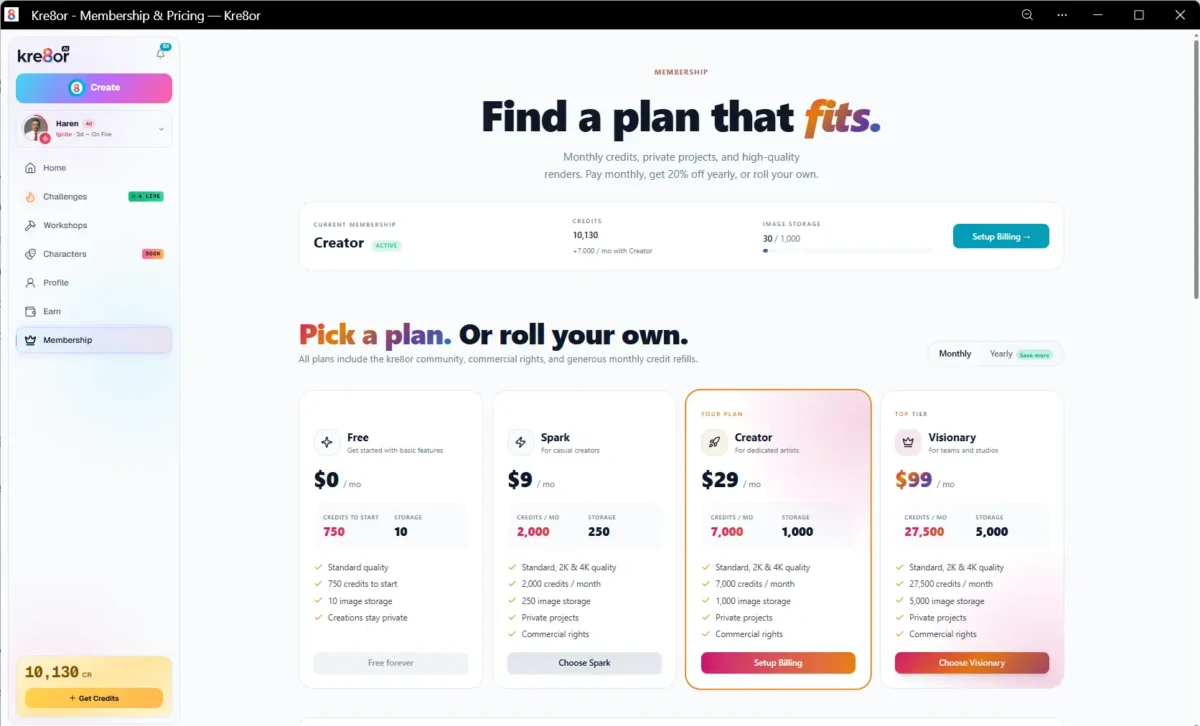
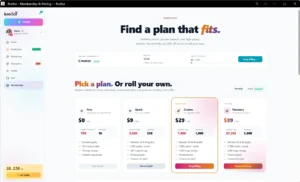
The Membership page clearly compares every plan, showing monthly credits, storage limits, and creator features.
💡 During my testing
I tested Kre8or.ai using the Creator Membership, which includes 7,000 monthly credits, 1,000 image storage, commercial rights, private projects, and access to all creator features. All of the screenshots and observations in this review are based on my experience using this plan.
Available Membership Plans
Kre8or.ai currently offers four primary membership levels, allowing users to choose a plan that matches both their creative needs and budget.
| Plan | Monthly Price | Monthly Credits | Storage | Best For |
|---|---|---|---|---|
| Free | $0 | 750 starter credits | 10 images | Beginners exploring the platform |
| Spark | $9/month | 2,000 credits | 250 images | Casual creators |
| Creator | $29/month | 7,000 credits | 1,000 images | Bloggers, marketers, designers, affiliate marketers |
| Visionary | $99/month | 27,500 credits | 5,000 images | Teams, agencies, professional studios |
Each paid membership includes:
- Standard, 2K and 4K image generation
- Commercial usage rights
- Private projects
- Monthly credit refills
- Access to the Kre8or creator community
Ready to Get Started?
If you’ve decided Kre8or.ai fits your workflow, I recommend starting with the Free Plan.
If you already know you’ll be creating content regularly—as I do—the Creator Plan offers the best balance of monthly credits, storage, and commercial rights.
💡 My Observation
I appreciated that Kre8or.ai doesn’t overwhelm users with dozens of confusing subscription tiers. The progression from Free → Spark → Creator → Visionary feels logical, making it easier to choose a plan based on your workload rather than decoding complicated feature lists.
For most bloggers, affiliate marketers, and content creators, the Creator Plan appears to provide the best balance between monthly credits, storage, and price.
Credit Top-Up System
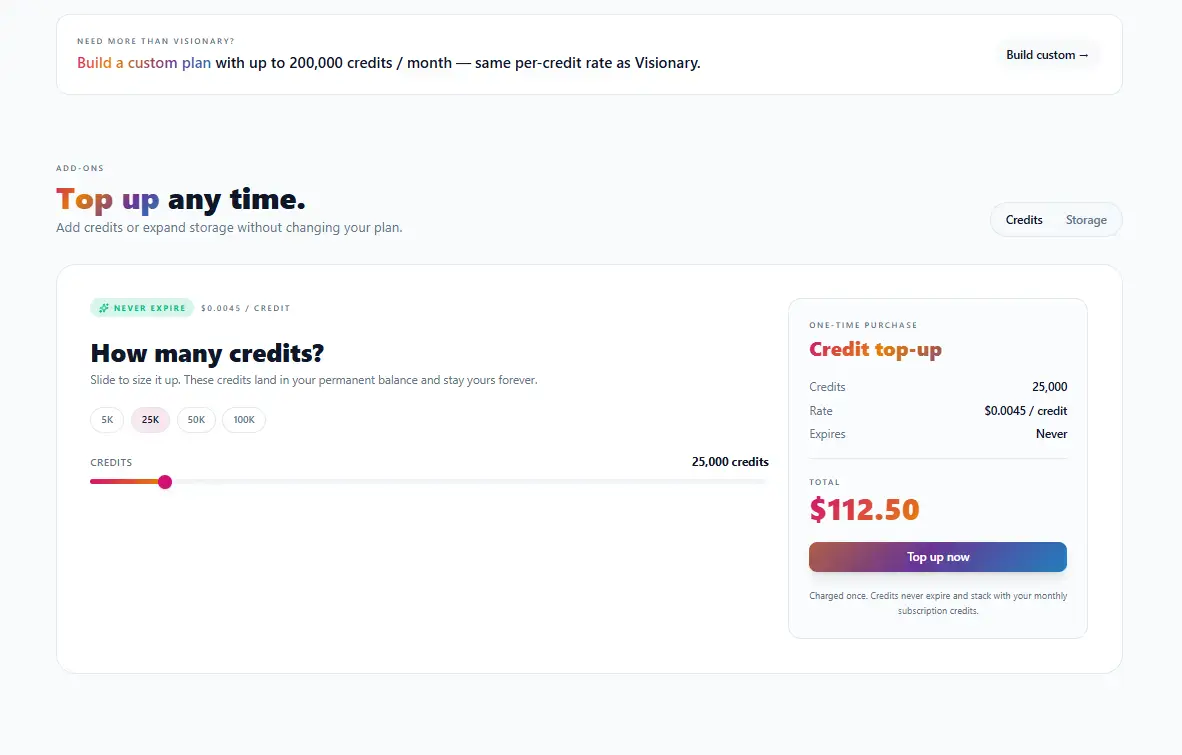
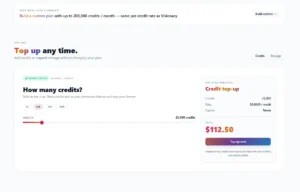
Additional credits can be purchased at any time without changing your membership plan.
Flexible Credit Top-Ups
Another feature I found useful is the ability to purchase additional credits whenever needed.
Rather than forcing users to upgrade to a more expensive subscription, Kre8or.ai allows creators to buy extra credits separately. According to the current pricing, credits purchased as a top-up never expire, making them ideal for occasional high-volume projects.
This flexibility is especially valuable for creators who may need extra image generation capacity during product launches, marketing campaigns, or seasonal content creation.
📌 Editorial Note
One feature I particularly like is that monthly memberships and one-time credit purchases work together. If you occasionally exceed your monthly credit allowance, you don’t necessarily have to upgrade your subscription—you can simply purchase additional credits when needed.
That approach gives creators more flexibility and helps avoid paying for a larger monthly plan throughout the year.
Commercial Rights Included
One detail many users overlook when comparing AI image generators is commercial licensing.
Every paid Kre8or.ai membership includes commercial rights, meaning images can be used for business projects such as:
- Blog graphics
- Social media content
- Marketing campaigns
- Product pages
- Client work
- Website illustrations
- Advertising materials
For bloggers and affiliate marketers like myself, this adds significant value because it removes uncertainty about whether generated images can be used commercially.
Pricing FAQ
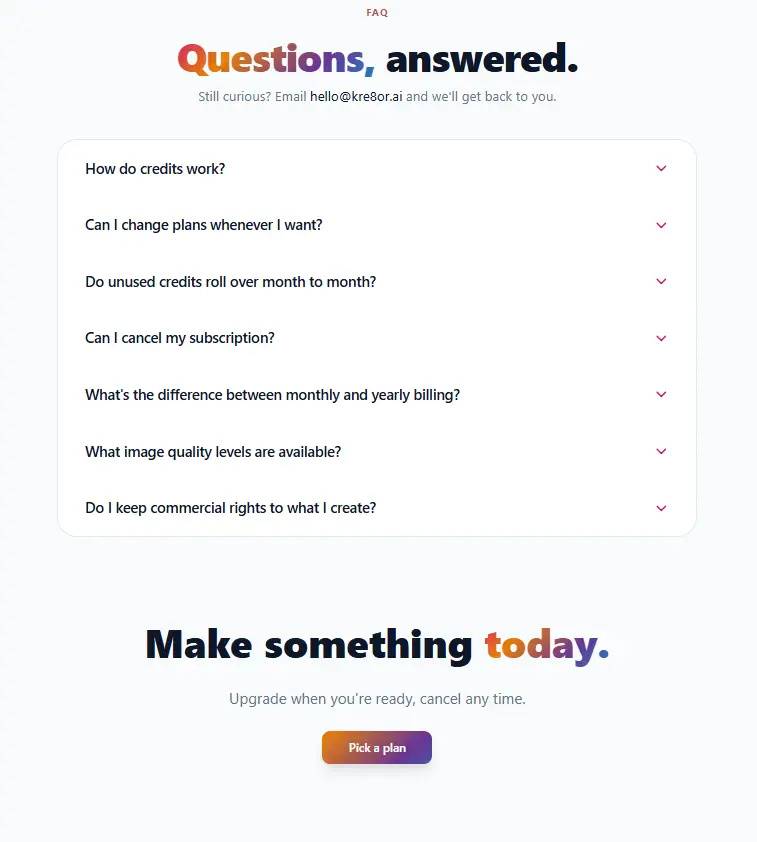
The built-in FAQ answers common questions about billing, credits, commercial rights, image quality, and subscription management.
Transparent Pricing Information
The pricing page also includes a helpful FAQ that answers common membership questions, including:
- How the credit system works
- Whether unused credits roll over
- How monthly and yearly billing differ
- Subscription cancellation
- Commercial usage rights
- Available image quality options
Having these answers directly on the pricing page makes it easier for new users to understand the platform before subscribing.
⭐ My Recommendation
After reviewing all available plans, here’s who I think each one suits best:
| If you are… | Recommended Plan |
|---|---|
| Trying Kre8or.ai for the first time | Free |
| Casual creator | Spark |
| Blogger or affiliate marketer | ⭐ Creator |
| YouTuber or social media creator | ⭐ Creator |
| Small business owner | ⭐ Creator |
| Agency or creative studio | Visionary |
💬 My Final Thoughts on Membership
Overall, I found Kre8or.ai’s pricing structure to be both transparent and creator-friendly. Rather than relying on confusing credit packages or hidden feature restrictions, the platform offers a clear progression from beginner to professional plans while keeping commercial rights and community features included.
For most individual creators, bloggers, and affiliate marketers, I believe the Creator Plan delivers the strongest balance of monthly credits, storage capacity, and overall value. The ability to purchase additional credits separately is another welcome feature, allowing creators to scale their usage without committing to a more expensive subscription.
Earn with Kre8or.ai
Entire Earn Dashboard
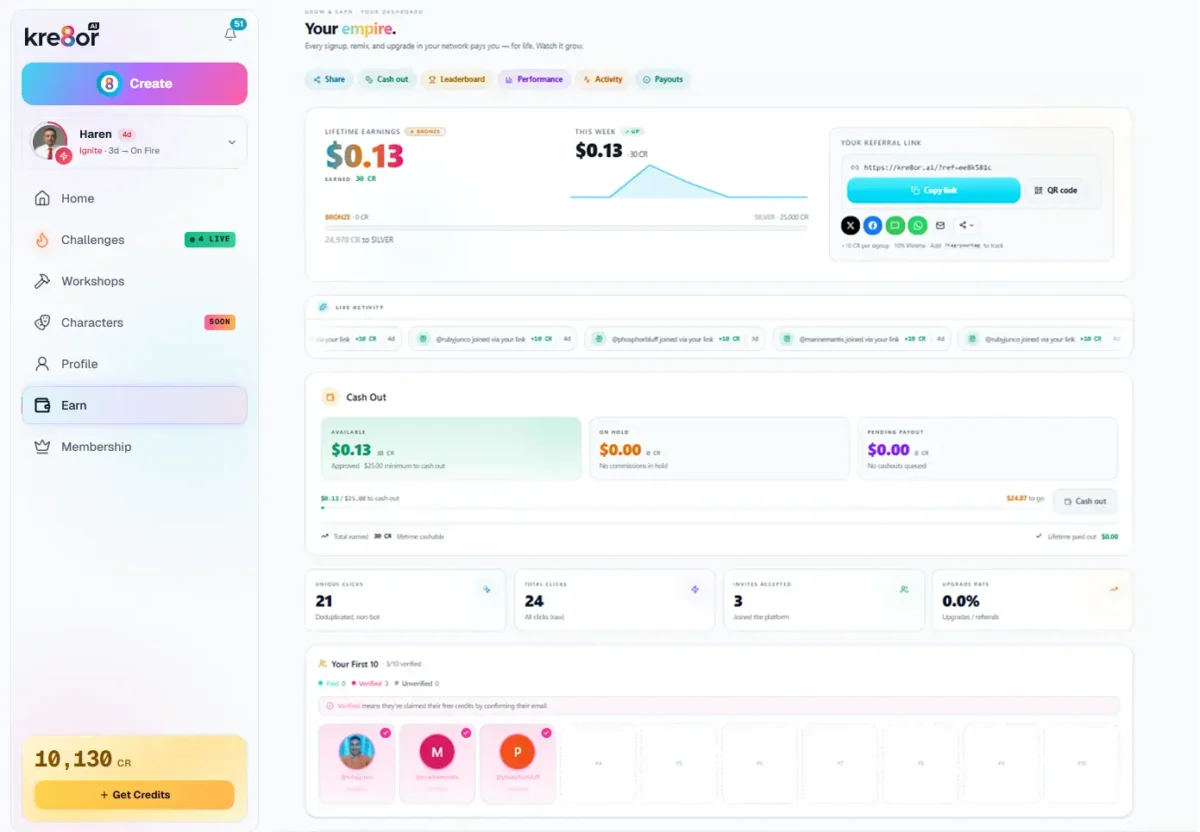
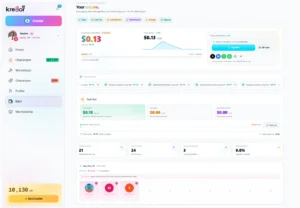
The Earn dashboard lets creators track referrals, commissions, payouts, campaign performance, and affiliate statistics from one place.
More Than an Affiliate Program
One feature that surprised me during early access was how much effort Kre8or.ai has put into its creator rewards system. Rather than providing only a referral link, the platform includes a dedicated earnings dashboard that helps creators monitor every stage of their referral performance.
From a single page, I could view lifetime earnings, referral activity, clicks, signups, cash-out progress, and campaign performance without needing any third-party tracking tools.
For creators who plan to recommend Kre8or.ai through YouTube, blogs, newsletters, or social media, this dashboard provides useful insights into what is actually generating results.
Share Your Referral Link Anywhere
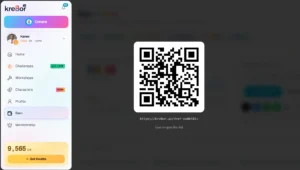
Kre8or.ai Affiliate QR Code
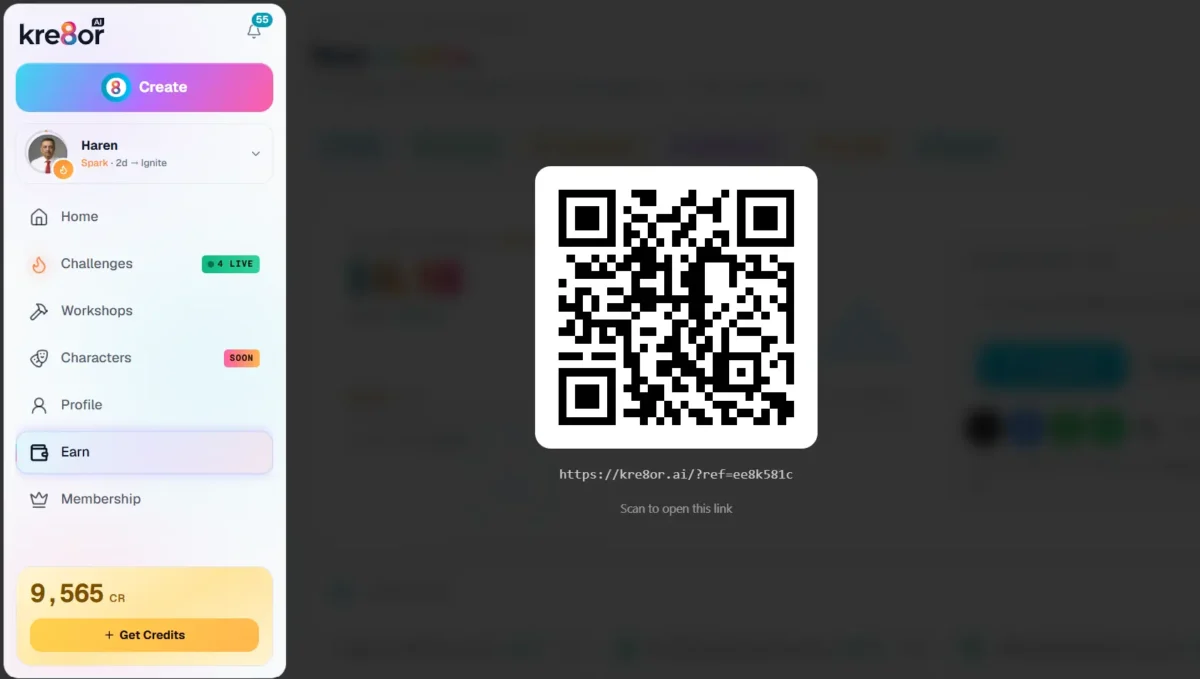
Every affiliate account includes a shareable QR code linked to your referral URL.
One feature I appreciated during testing was that Kre8or.ai doesn’t just provide a standard referral link. It also automatically generates a QR code linked to your affiliate URL.
This makes it convenient to promote Kre8or.ai in different ways. Whether you’re creating YouTube videos, giving presentations, attending creator meetups, or printing promotional materials, people can simply scan the QR code to visit your referral page instantly.
While most affiliates will probably rely on blog posts, social media, and email marketing, having a ready-made QR code is a thoughtful addition that removes the need to generate one using a third-party tool.
What the Dashboard Includes
During testing, I found the dashboard includes:
- Lifetime earnings
- Weekly earnings graph
- Referral link and QR code
- One-click social sharing
- Cash-out progress
- Referral statistics
- Click tracking
- Signup tracking
- Conversion analytics
- Campaign tags
- Traffic source reports
- Earnings history
- Multiple payout methods
Compared to many affiliate dashboards that only display clicks and commissions, Kre8or.ai provides a much more complete picture of referral performance.
Performance Analytics
Analytics & Campaign Performance
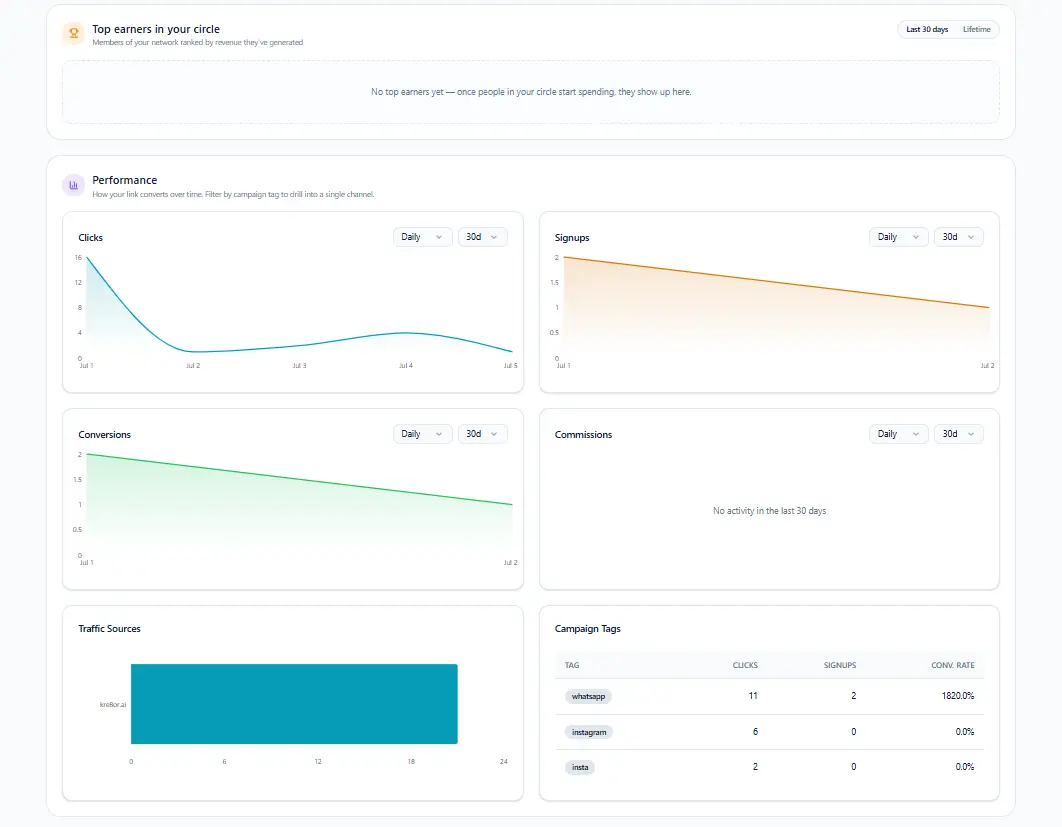
Campaign tracking helps creators understand where clicks, signups, and conversions originate.
One feature I especially appreciated was the built-in analytics. Instead of guessing where referrals are coming from, the dashboard records:
- Clicks
- Signups
- Conversion rates
- Traffic sources
- Campaign tags
This makes it easy to compare different promotional channels. For example, bloggers can track article performance, while YouTubers or social media creators can measure results from individual campaigns using custom tags.
Having these analytics built directly into the platform removes much of the guesswork involved in affiliate marketing.
Earnings History & Payouts
Earnings History & Payout Options
Every approved referral commission is recorded, with several payout options available once the cash-out threshold is reached.
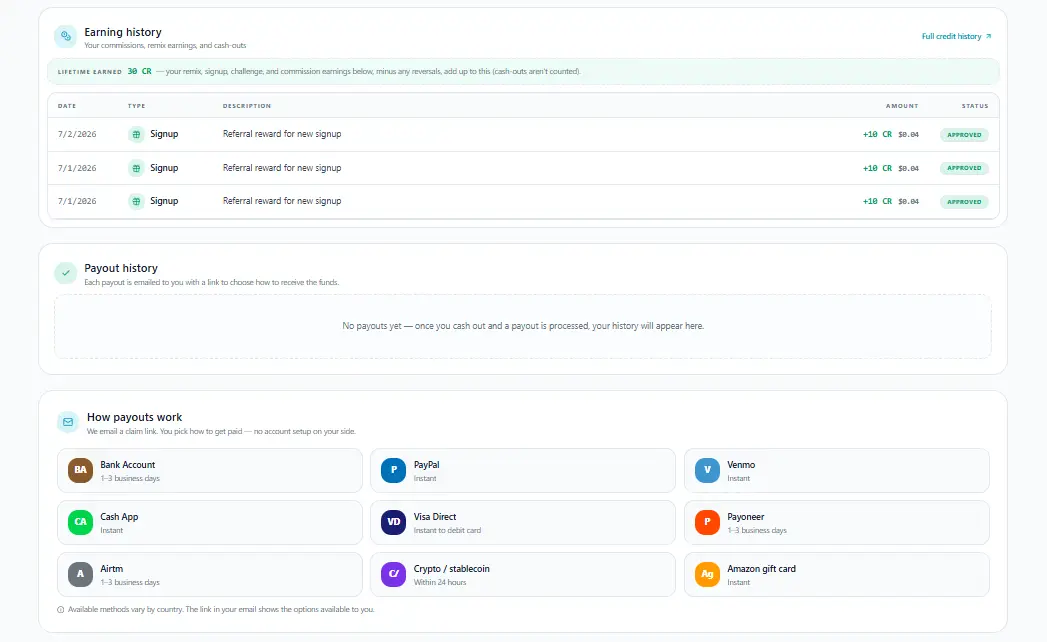
The platform also maintains a detailed earnings history, showing where each commission originated and whether it has been approved.
Another welcome feature is the variety of payout methods. Depending on your country, supported options include the following:
- Bank Transfer
- PayPal
- Venmo
- Cash App
- Payoneer
- Visa Direct
- Amazon Gift Cards
- Cryptocurrency / Stablecoins
- Airtm
For international creators, offering multiple payout choices is a significant advantage over affiliate programs that only support one payment method.
💡 My Experience
As someone who has promoted affiliate products for several years, I can say the earning dashboard feels much more polished than many standalone affiliate systems.
I particularly like that everything is integrated into the same platform where creators generate images, participate in challenges, and learn through workshops. There is no need to switch between separate creator tools and affiliate portals.
The addition of campaign tags, traffic analytics, referral tracking, and multiple payout options suggests that Kre8or.ai is investing seriously in helping creators grow alongside the platform rather than simply offering a basic referral link.
⭐ My Rating
| Category | Rating |
|---|---|
| Tracking & Analytics | ⭐⭐⭐⭐⭐ (5.0/5) |
| Ease of Use | ⭐⭐⭐⭐⭐ (5.0/5) |
| Payout Transparency | ⭐⭐⭐⭐⭐ (5.0/5) |
| Affiliate Features | ⭐⭐⭐⭐⭐ (5.0/5) |
Understanding How Kre8or.ai Credits Work
After choosing the right membership plan, the next thing to understand is how Kre8or.ai’s credit system works in everyday use.
At first, I assumed credits were simply deducted every time I generated an image. However, after exploring the platform, I discovered that the system is more flexible than that. Kre8or.ai combines monthly membership credits, permanent top-up credits, challenge participation, and commercial usage rights into a creator-friendly system that lets you scale your usage without constantly changing subscription plans.
Once you understand how these different credit types work together, it becomes much easier to choose the right membership and estimate how much AI image generation you’ll need each month.
Monthly Credits
Every paid membership includes a fresh allocation of credits each month. These credits are intended for your regular AI image generation and other supported creator activities.
As long as your subscription remains active, a new allocation is added at the beginning of each billing cycle, making it easy to plan your monthly creative workload.
💡 My Observation
For creators who publish content consistently, monthly credits provide a predictable way to manage AI usage without worrying about purchasing additional credits every few days.
Permanent Top-Up Credits
One feature I particularly liked is that Kre8or.ai doesn’t force you to upgrade your membership simply because you have a busy month.
If you temporarily need more credits—for example, while preparing a product launch, marketing campaign, or large client project—you can purchase additional credit packs separately.
According to the current pricing, these purchased credits do not expire, allowing you to save them for future projects whenever you need them.
How Credits Are Used
Rather than charging separately for every feature, Kre8or.ai uses credits as the platform’s internal currency.
Depending on the feature you’re using, credits may be used for:
- Creating AI images
- Running Workshop transformations
- Entering eligible Challenges
- Higher-resolution image generation
- Future premium creator features as the platform expands
Because credit requirements may vary between activities, it’s a good idea to monitor your balance before starting larger creative projects.
Image Storage
Credits determine what you can create, while your membership plan determines how many finished images you can keep stored inside your account.
This separation makes sense because it allows creators to manage both their monthly AI usage and their long-term image library independently.
If you generate large amounts of content every month, choosing a plan with higher storage capacity can become just as important as having additional credits.
Commercial Usage Rights
Another important point is that all paid memberships include commercial usage rights.
This means images created through Kre8or.ai can be used for business purposes such as:
- Blog articles
- Affiliate marketing
- Social media campaigns
- Website graphics
- Product promotions
- Client projects
For me, this removes one of the biggest concerns creators often have when using AI-generated images commercially.
💡 My Take
After spending time with the platform, I found the credit system surprisingly easy to understand. Rather than locking users into a single rigid subscription, Kre8or.ai lets creators combine monthly credits with permanent top-up credits whenever needed. That flexibility makes much more sense than forcing users to upgrade to a higher plan simply because one particular month requires more image generation.
Who Should Use Kre8or.ai?
Kre8or.ai isn’t designed for just one type of creator. During my early-access testing, I found that different features appeal to different audiences. Some users will appreciate the guided Workshops, while others may be more interested in the community Challenges, commercial image generation, or the built-in creator rewards.
Here’s who I believe will benefit most from the platform.
Bloggers ⭐⭐⭐⭐⭐
If you regularly publish blog articles, Kre8or.ai can become a valuable content creation companion.
Instead of searching through stock photo websites or spending hours editing graphics, you can use guided Workshops to create featured images, illustrations, social media graphics, and promotional visuals tailored to your content.
I especially liked how the Workshop library removes much of the guesswork from AI image generation, making it easier to produce professional-looking images even if you’re new to AI.
Ideal for:
- Featured blog images
- Pinterest graphics
- Article illustrations
- Website banners
- Social media posts
Affiliate Marketers ⭐⭐⭐⭐⭐
As an affiliate marketer myself, I see significant potential in Kre8or.ai.
The platform can help create eye-catching promotional graphics, comparison images, product showcases, and branded visuals that make affiliate content more engaging. The commercial usage rights included with paid memberships also provide confidence that generated images can be used in business projects.
Beyond image creation, the built-in creator rewards and referral dashboard make Kre8or.ai particularly interesting for marketers who enjoy promoting tools they genuinely use.
Content Creators & YouTubers ⭐⭐⭐⭐⭐
Whether you create videos, podcasts, newsletters, or social media content, Kre8or.ai offers plenty of opportunities to enhance your visual branding.
The Workshop library includes templates for podcast covers, professional headshots, cinematic portraits, thumbnails, and promotional graphics, helping creators maintain a consistent visual identity across multiple platforms.
Small Business Owners ⭐⭐⭐⭐☆
Small businesses often need professional-looking graphics but don’t always have the budget for a full-time designer.
Kre8or.ai can help create marketing visuals, product images, promotional graphics, seasonal campaigns, and social media content without requiring advanced design skills.
While it won’t replace a professional branding agency, it can significantly reduce the time and cost involved in creating everyday marketing materials.
Designers & Creative Professionals ⭐⭐⭐⭐☆
Professional designers may appreciate Kre8or.ai for rapid concept development, creative inspiration, and experimenting with new visual styles.
However, if your work depends heavily on precise manual editing and complete artistic control, you’ll likely continue using software such as Photoshop or Illustrator alongside AI-generated images.
Rather than replacing professional design tools, Kre8or.ai works well as a complementary creative assistant.
Complete Beginners ⭐⭐⭐⭐⭐
One of the biggest strengths I noticed during testing is how beginner-friendly the platform feels.
Instead of expecting users to write detailed AI prompts from scratch, Kre8or.ai guides them through ready-made Workshops, making it much easier to produce quality results from the very beginning.
If you’ve always wanted to experiment with AI image generation but felt overwhelmed by prompt engineering, this platform offers a much gentler learning curve.
If you recognized yourself in one of these creator categories, the easiest way to see whether Kre8or.ai fits your workflow is to try it yourself.
You can start with the free membership and upgrade later only if you need additional credits and features.
💡 My Recommendation
After spending considerable time exploring the platform, I believe Kre8or.ai delivers the most value for creators who produce content regularly rather than occasionally.
If you’re a blogger, affiliate marketer, YouTuber, educator, or small business owner who frequently needs original images, marketing graphics, or branded visuals, the platform offers a practical combination of AI creation, community engagement, and earning opportunities that extends beyond simple image generation.
⭐ Quick Recommendation Table
| User Type | Recommendation | Why |
|---|---|---|
| Bloggers | ⭐⭐⭐⭐⭐ | Create original featured images, blog graphics, and promotional visuals. |
| Affiliate Marketers | ⭐⭐⭐⭐⭐ | Produce marketing assets and benefit from the referral program. |
| Content Creators | ⭐⭐⭐⭐⭐ | Generate thumbnails, podcast covers, and social media content. |
| Small Business Owners | ⭐⭐⭐⭐☆ | Affordable marketing graphics without advanced design skills. |
| Designers | ⭐⭐⭐⭐☆ | Great for concepts and inspiration alongside professional tools. |
| Beginners | ⭐⭐⭐⭐⭐ | Guided Workshops make AI image creation easy to learn. |
Pros & Cons
After spending several days exploring Kre8or.ai during its early-access phase, I found far more strengths than weaknesses. The platform offers a refreshing combination of AI image generation, guided creative workflows, community participation, and creator rewards that goes well beyond what most AI image generators currently provide.
That said, no platform is perfect—especially one that’s still evolving. Here are the advantages and limitations I personally experienced while testing Kre8or.ai.
✅ What I Liked
🎨 Guided Workshops Make AI Accessible
The Workshop library quickly became my favorite feature. Instead of spending time experimenting with complex prompts, I could simply choose a workflow, upload an image when required, and let Kre8or.ai handle much of the creative process. This dramatically lowers the learning curve for beginners while still producing impressive results.
🌍 A Real Creator Community
Unlike many AI tools that focus solely on image generation, Kre8or.ai encourages creators to interact through Workshops, Challenges, voting, and shared inspiration. That sense of community makes the platform feel active rather than isolated.
🏆 Creative Challenges Keep You Engaged
The themed Challenges add an enjoyable competitive element. They encourage experimentation, inspire new ideas, and provide an opportunity to earn recognition within the community.
⚖️ Fair Blind Voting System
I particularly appreciated that voting is anonymous. Images are judged on creativity and how well they match the challenge theme rather than on the popularity of the creator. This creates a fairer competition and encourages unbiased judging.
💼 Excellent for Bloggers & Affiliate Marketers
As someone who builds websites and creates affiliate marketing content, I found Kre8or.ai especially useful for producing blog illustrations, promotional graphics, featured images, and branded visuals. The included commercial usage rights make it suitable for professional content creation.
💰 Built-In Creator Rewards
The integrated affiliate dashboard is one of the strongest creator-focused features. Referral tracking, campaign analytics, QR code generation, and multiple payout options are all available from within the platform, making it easy to monitor promotional performance.
🚀 Continuous Development
Because I joined during early access, I had the opportunity to watch the platform evolve. New Workshops and improvements are being introduced regularly, giving me confidence that Kre8or.ai is actively growing rather than remaining static.
❌ Areas That Could Be Improved
🔄 Repeated Image Pairs During Voting
One issue I encountered during blind voting was that the same image pairs occasionally appeared multiple times. Even after reporting entries as off-theme, I still had to select one image before receiving another comparison. A “Skip This Pair” option would make long voting sessions smoother.
🔍 More Workshop Filters Would Help
As the Workshop library continues to grow, additional search and filtering options would make it easier to discover specific styles or creative workflows.
👥 Growing Community
Although the community is active and welcoming, it is naturally smaller than those surrounding long-established AI platforms. As more creators join, Challenges, collaborations, and shared inspiration should become even more vibrant.
🧪 Still Evolving
Kre8or.ai is currently in its early-access stage. While I found the core features stable during my testing, some areas are still developing and will likely become more polished as the platform matures.
My Experience Using Kre8or.ai During Early Access
Why I Joined Kre8or.ai
When I first heard about Kre8or.ai, I wasn’t simply looking for another AI image generator. As someone who regularly creates blog content, affiliate marketing graphics, and educational resources, I’m always interested in tools that can improve both creativity and productivity.
What caught my attention wasn’t just the AI image generation itself—it was the combination of Workshops, Community Challenges, Creator Rewards, and an integrated affiliate program. That broader ecosystem made me curious enough to join the early-access program and explore the platform before its public launch.
My First Impression
My first impression was that Kre8or.ai felt different from most AI image generators I had used previously.
Instead of opening to a simple prompt box, I was welcomed by an active creator community, guided workshops, ongoing challenges, and a dashboard that encouraged exploration. Rather than asking, “What prompt should I write?” the platform encouraged me to discover different creative possibilities through structured workflows.
That immediately lowered the learning curve and made the platform feel approachable, even for someone who doesn’t enjoy writing long AI prompts.
What Surprised Me Most
The feature that surprised me most was the Workshop system.
Initially, I expected to spend most of my time experimenting with image generation. Instead, I found myself exploring the growing collection of guided workshops, browsing community creations, and participating in the challenge system.
The combination of Workshops, Challenges, Voting, and Creator Rewards made Kre8or.ai feel more like a creative community than simply another AI tool.
What I Liked Most
Several aspects of Kre8or.ai stood out during my testing:
- The guided Workshop approach makes image creation accessible for beginners.
- Community Challenges provide creative inspiration and encourage continuous learning.
- Blind voting helps keep competitions fair and engaging.
- The creator dashboard combines image generation, community participation, and earnings in one place.
- The affiliate dashboard includes detailed analytics and multiple payout options.
- The platform continues to evolve rapidly with regular improvements.
What Could Be Improved
Although my overall experience has been very positive, there are still areas where I believe the platform can become even better.
As an early-access product, some features are naturally still evolving. I would personally like to see more advanced search filters for workshops, additional credit usage estimates before image generation, and continued expansion of the workshop library as more creators join the platform.
None of these points prevented me from enjoying the platform, but they represent opportunities that could make an already good experience even stronger.
One Small Frustration I Experienced
While testing the community voting system, I noticed one aspect that occasionally became frustrating.
During blind voting, I was sometimes shown the same image pairs repeatedly, even after reporting an entry as off-theme. To move on to the next comparison, I still had to select one of the images in the current pair—even when I felt that neither image deserved a vote because both appeared to violate the challenge guidelines.
From my perspective, it would be a better experience if reported image pairs could be skipped automatically or replaced with a fresh comparison. This would keep the voting process moving smoothly while avoiding situations where voters feel forced to choose between two unsuitable entries.
Despite this minor inconvenience, I still found the overall blind voting system to be fair and engaging. Since Kre8or.ai is still evolving, I hope this workflow will continue to improve as the platform matures.
Suggested Improvement
It would be helpful to add a “Skip This Pair” button that becomes available after both images have been reported or when a voter genuinely feels that neither entry matches the challenge. This small addition could make long voting sessions more enjoyable while preserving the integrity of the judging process.
Will I Continue Using Kre8or.ai?
Yes.
Based on my experience so far, I intend to continue using Kre8or.ai beyond this review.
The platform fits well into my existing workflow for blogging, affiliate marketing, and content creation. More importantly, I appreciate that the team appears to be actively developing new features while building a community around creators rather than focusing solely on AI image generation.
I’ll also continue updating this review as new features are released and as I gain more experience with the platform over time.
💡 My Honest Take
After spending time exploring Kre8or.ai during its early-access phase, I don’t see it as just another AI image generator. I see it as a growing creator ecosystem that combines AI-powered creativity with community participation, learning, and earning opportunities. While there is still room for improvement, the foundation is solid, and I’m genuinely interested to see how the platform evolves over the coming months.
Frequently Asked Questions (FAQ)
Kre8or.ai is an AI-powered creative platform that combines image generation with guided Workshops, community Challenges, creator rewards, and an integrated affiliate program. Rather than functioning as a standalone AI image generator, it aims to build a complete ecosystem for creators, marketers, and digital entrepreneurs.
Yes. Kre8or.ai offers a Free Membership that allows new users to explore the platform and generate images using a limited number of starter credits. Paid memberships provide additional monthly credits, higher storage limits, commercial usage rights, and access to more advanced creator features.
Kre8or.ai uses a credit-based system for AI image generation and selected platform activities. Paid memberships receive a fresh allocation of credits every month, while additional credit packs can be purchased separately whenever extra usage is needed.
According to the current pricing information available during my testing, purchased top-up credits do not expire. This allows creators to save unused credits for future projects instead of worrying about losing them at the end of the month.
Yes. All paid memberships include commercial usage rights, allowing creators to use generated images for websites, blogs, social media, marketing campaigns, advertisements, client projects, and other business purposes.
Workshops are guided creative workflows designed to simplify AI image generation. Instead of writing complex prompts from scratch, users select a Workshop, upload an image when required, choose the desired style or transformation, and let Kre8or.ai handle much of the creative process.
Challenges invite creators to submit AI-generated artwork based on a specific theme. After submissions close, entries are judged through an anonymous head-to-head voting system where community members compare two images at a time. Winners share the prize pool according to the challenge rules.
Yes. Kre8or.ai includes a built-in affiliate program that allows creators to earn commissions by referring new members. The platform also provides detailed referral analytics, campaign tracking, payout options, and earnings history directly within the creator dashboard.
Absolutely. One of the platform’s biggest strengths is its beginner-friendly design. The guided Workshop system reduces the need for advanced prompt engineering, making it much easier for newcomers to start creating high-quality AI images.
Based on my testing, Kre8or.ai is an excellent choice for bloggers, affiliate marketers, content creators, small business owners, educators, and anyone who regularly needs original visual content. The combination of AI image generation, Workshops, community features, and creator rewards makes it more versatile than many traditional AI image generators.
If you plan to create AI-generated content regularly, I believe the Creator Membership offers the best overall value. It provides a generous monthly credit allowance, commercial usage rights, increased storage, private projects, and access to the platform’s full creator ecosystem.
Yes. This review is based on my personal experience using Kre8or.ai during its early-access phase. As the platform continues to evolve, I’ll update this article with new features, additional screenshots, fresh observations, and long-term testing results to keep the information accurate and relevant.
If you’re looking for an AI platform that goes beyond simple image generation by combining guided creative workflows, an active community, earning opportunities, and commercial-friendly licensing, I believe Kre8or.ai is well worth exploring. Starting with the free membership is an excellent way to experience the platform before deciding whether a paid plan matches your creative needs.
Final Thoughts: Is Kre8or.ai Worth It?
After spending several days exploring Kre8or.ai during its early-access phase, I came away genuinely impressed. While I initially joined to evaluate another AI image generator, I quickly realized the platform is trying to build something much bigger.
The guided Workshops make AI image creation approachable for beginners, the Challenges add an engaging community element, and the integrated creator ecosystem—including earning opportunities, commercial licensing, and affiliate tools—gives Kre8or.ai an identity that extends beyond simply generating images.
Like any platform still under active development, there are areas I’d like to see improved. During my testing, I occasionally encountered repeated image pairs while blind voting, and a few workflows could become even smoother as the platform matures. However, these were relatively minor issues and didn’t reduce the overall quality of my experience.
My Recommendation
Based on my hands-on testing, I believe Kre8or.ai already delivers enough value to recommend trying—especially if you’re interested in AI-powered content creation rather than just experimenting with image generation.
What impressed me most wasn’t any single feature. It was how the different parts of the platform work together. Workshops help you create, Challenges inspire creativity, community voting encourages participation, and the creator dashboard provides opportunities to track growth and earn commissions. Few AI image platforms currently offer that complete experience.
I’ll continue updating this review as Kre8or.ai evolves, testing new features, expanding the screenshot library, and sharing long-term observations. My goal is to keep this one of the most comprehensive and up-to-date Kre8or.ai reviews available.
If you’d like to experience the platform yourself, you can start with the free membership and explore its features at your own pace. If you later decide to upgrade using my referral link, you’ll support AffiliatesEarnings.com at no additional cost to you. Thank you for supporting independent, hands-on reviews.
Ready to Explore Kre8or.ai?
If you’ve read this far, you already know exactly what impressed me—and where I think the platform can still improve.
Rather than relying only on my experience, I encourage you to explore Kre8or.ai yourself. The free membership lets you experience the Workshops, Challenges, and creator community before spending anything.
If you decide to upgrade later using my referral link, I’ll earn a small commission at no extra cost to you. It helps support the time I invest in creating detailed, hands-on reviews like this, and I genuinely appreciate your support.